
Jetlog on Apple Watch
What the four pages of the Jetlog watch app show, how to complete a flight from your wrist, and which complications you can add.
On this page
The watch app shows today's flight, your flight time limits, your hours and your on-time record, and it lets you complete a landed flight from your wrist. It needs an Apple Watch with watchOS 26 or later, paired with an iPhone that is signed in to Jetlog.
The watch has no login of its own. The iPhone sends it a summary of your logbook. When you open the watch app and the data is over an hour old, it asks the iPhone for a fresh copy.
The four pages #
Scroll with the Digital Crown or swipe up and down. The pages are Today, Limits, Graph and On time.
Today #
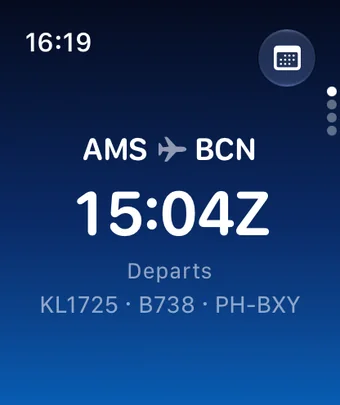
One large display that changes with your day:
- Before departure. Route, scheduled departure time in UTC and the caption "Departs". Where a TSAT is known you see a live countdown to it, with the TSAT and CTOT times. After the TSAT it reads "In TSAT window". The stand shows in a yellow pill and the gate with a door icon.
- Underway. Route and the arrival time with the caption "Arrives", or "In flight" when no arrival time is known.
- Landed, not completed. An orange "To complete" and a Review button.
- Done. "Day done" when every flight today is completed, "No flights today" when nothing is planned, "All caught up" when nothing is waiting.
The calendar button at the top right opens Schedule, with your flights and simulator sessions for the next 7 days. If the data is over an hour old a footer says "Updated N hours ago". In Always-On mode the countdown stops and the buttons are hidden.
Limits #
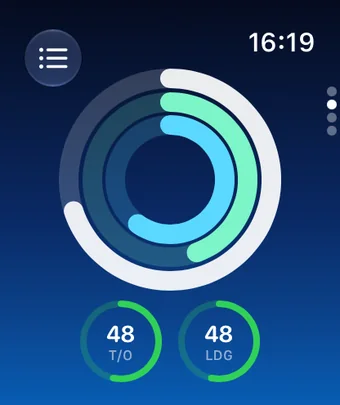
Three rings show your flight time against the EASA limits: 28d (100 hours), Year (900 hours, calendar year) and 12mo (1000 hours). A ring turns orange near the limit and red when you are close or over. Below the rings are gauges for T/O and LDG, and NGT when you have night data, showing how many days are left of the 90 day window. A gauge shows "Not current" when it has lapsed. The list button at the top left opens the details. See Currency, medical and flight time limits.
Graph #
Your hours flown. The calendar button at the top left switches between Week, Month and Year. Week shows time of day per day with night flying marked. Month shows hours per day and Year hours per month, both in UTC. The button at the top right opens Totals: All time, This year, This month, and your ATPL progress for total time and PIC.
On time #
Twelve monthly bars for the year, with the percentage over 12 months and the number of arrivals. A flight counts as on time when it arrives early or up to 5 minutes late at on-blocks. It needs both scheduled and actual on-blocks times.
Complete a flight from your watch #
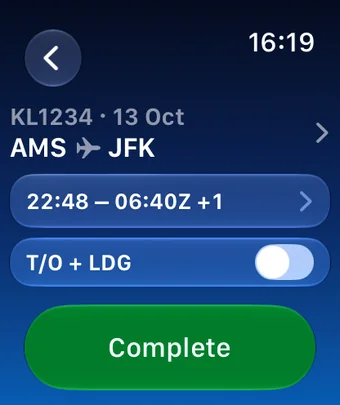
- On Today, tap Review for a landed flight. The double-tap gesture works too.
- Check the times row. To change a time, tap the row, tap the time and turn the wheel, then tap Set.
- Set the T/O + LDG switch. On it reads 1 T/O · 1 LDG.
- Tap Complete.
If a block time is missing the button reads Set off blocks or Set on blocks instead, and it opens the wheel. If the times conflict it reads Set times.
After Complete you see "Completed" and have 3 seconds to tap Undo before it is sent. If your iPhone is not nearby the watch says "Sends when your iPhone is nearby" and delivers it later. When the flight holds other take-off and landing counts, the switch is read-only. Simulator sessions show the session duration and have no switch.
Complications #
Add one from the watch face: touch and hold, tap Edit, then Complications. Available are FTL Rings, Currency, Flight Day, Hours This Month, Hours This Year, Total Hours, Flying Graph, ATPL Total, ATPL PIC, Fuel and On Time. They show what the iPhone last sent and update when it has new data.
When the watch shows nothing #
- Signed out. Sign in to Jetlog on your iPhone.
- Syncing. Keep your iPhone nearby and tap Retry.
- No graph data. Update Jetlog on your iPhone.
The watch also shows the flight Live Activity as a small card, see Live Activities on your Lock Screen.
Still stuck? Write to support and a pilot answers.